Lesson 2
アカウントの作成とXRPの送信
XRPL Testnetでアカウントを作成し、2つのアカウント間でXRPを送金します。

このレッスンでは、以下の方法を説明します。
- Testnet上にアカウントを作成します。アカウントには930テストXRPが付与されますが、実際の価値はありません。
- シード値からアカウントを取得します。
- アカウント間でXRPを送金します。
アカウントを作成すると、オフラインで公開鍵と秘密鍵のペアが生成されます。そのアカウントはXRPで資金が供給されるまで、XRP Ledgerには表示されません。このレッスンでは、テストネット用のアカウントを作成する方法を説明しますが、メインネットで使用できるアカウントの作成方法については説明しません。
コードを編集してみる:get-accounts-send-xrp.js
以下のインタラクティブなコード例は、Testnet、Devnet、Mainnetといった任意のXRP Ledgerネットワークで使用できます。ご自身で構築する際は、コードを更新して別の、または追加のXRP Ledgerネットワークを選択できます。
Open the Token Test Harness and get test accounts:
- コードサンドボックスを開く
- テストネットを選択
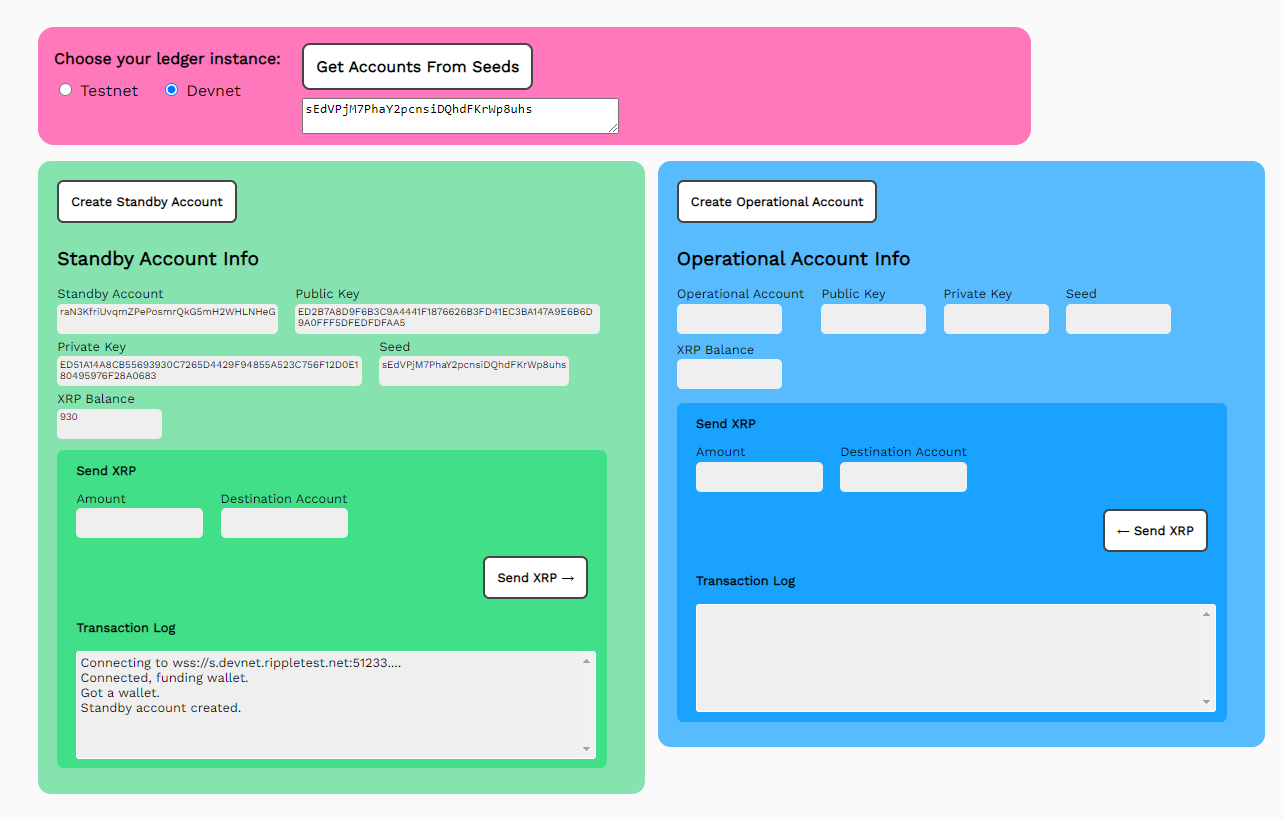
- 新規スタンバイアカウントを取得をクリック
- 新規運用アカウントを取得をクリック
- フォームを再読み込みした後でもアカウントを再利用できるように、シードフィールドをメモ帳などの永続的な場所にコピー&ペーストしてください。
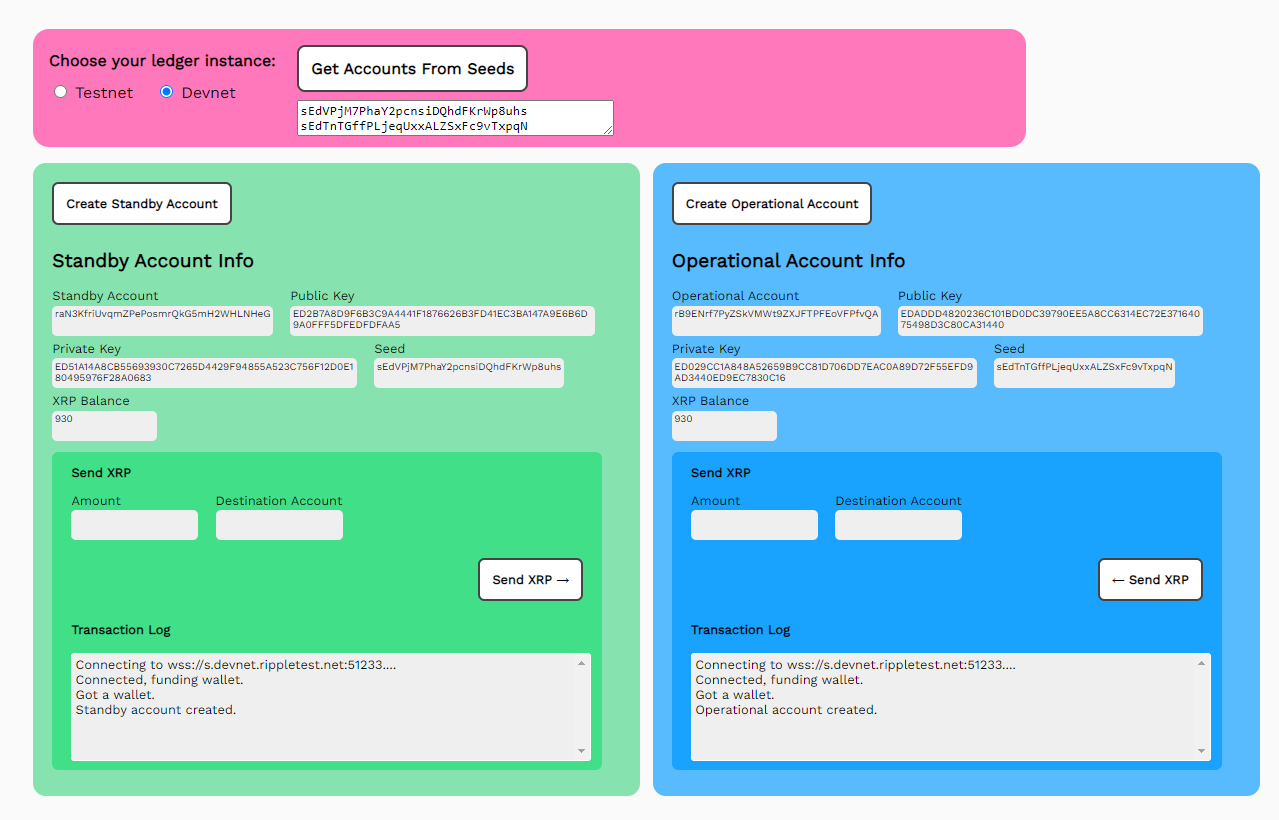
新しいアカウント間でXRPを送金できます。各アカウントには、それぞれ独自のフィールドとボタンがあります。
アカウント間でXRPを転送するには
- 送信するXRPの金額を入力
- 宛先アカウントを入力してください(たとえば、運用アカウントAccountフィールドをコピーして宛先のスタンバイフィールドに貼り付けます)。
- スタンバイアカウントから運用アカウントへXRPを送金するにはXRP送信>を、運用アカウントからスタンバイアカウントへXRPを送金するには<XRP送信を使用します。
JavaScriptコードのウォークスルー:get-accounts-send-xrp.js
此範例この例は、Testnet、Devnet、Mainnetなど、あらゆるXRP Ledgerネットワークで使用できます。コードを更新して、別の、または追加のXRP Ledgerネットワークを選択できます。
次に、results 変数を使って進行状況に関する情報を取得(キャプチャ)します。
フォームフィールドの定義
コード全体を通して、JavaScriptの関数であるdocument.getElementById()を使用しています。これは、CSS IDによってHTML要素をターゲットにするために使用されます。これらの関数を使用して、Token Test HarnessのHTMLフォームフィールドに値を設定したり、取得したりします。コードの可読性を保つために、これらの関数呼び出しを置き換えるいくつかの定数を定義しました。
// *** HTMLフォームのフィールドを定義する **
const xls = document.getElementById("xls")
const tn = document.getElementById("tn")
const dn = document.getElementById("dn")
const standbyResultField = document.getElementById('standbyResultField');
const operationalResultsField = document.getElementById('operationalResultField');
const standbyAccountField = document.getElementById('standbyAccountField');
const standbyPubKeyField = document.getElementById('standbyPubKeyField');
const standbyPrivKeyField = document.getElementById('standbyPrivKeyField');
const standbyBalanceField = document.getElementById('standbyBalanceField');
const standbySeedField = document.getElementById('standbySeedField');
const operationalAccountField = document.getElementById('operationalAccountField');
const operationalPubKeyField = document.getElementById('operationalPubKeyField');
const operationalPrivKeyField = document.getElementById('operationalPrivKeyField');
const operationalSeedField = document.getElementById('operationalSeedField');
const operationalBalanceField = document.getElementById('operationalBalanceField');
getNet() and getAccount(type)
// ************* 優先ネットワークを取得 **************
    function getNet() {
        let net
           if (tn.checked) net = "wss://s.altnet.rippletest.net:51233"
           if (dn.checked) net = "wss://s.devnet.rippletest.net:51233"
           return net
        } // End of getNet()の最後

// *******************************************************
// ************* アカウントの取得 *****************************
// *******************************************************

  async function getAccount(type) {
      let net = getNet()

      const client = new xrpl.Client(net)
        results = 'Connecting to ' + net + '....'

        // これはTestnet/Devnet用のデフォルトのfaucetを使用
        let faucetHost = null
        if(document.getElementById("xls").checked) {
            faucetHost = "faucet-nft.ripple.com"
        }
        if (type == 'standby') {
          standbyResultField.value = results
        } else {
          operationalResultField.value = results
        }
        await client.connect()

        results += 'nConnected, funding wallet.'
        if (type == 'standby') {
          standbyResultField.value = results
        } else {
          operationalResultField.value = results
        }

        // -----------------------------------テストアカウントのウォレットを作成して資金を投入する
       const my_wallet = (await client.fundWallet(null, { faucetHost })).wallet

        results += 'nGot a wallet.'
        if (type == 'standby') {
          standbyResultField.value = results
        } else {
          operationalResultField.value = results
        }

        // -----------------------------------現在の残高を取得します。
        const my_balance = (await client.getXrpBalance(my_wallet.address))

        if (type == 'standby') {
          standbyAccountField.value = my_wallet.address
          standbyPubKeyField.value = my_wallet.publicKey
          standbyPrivKeyField.value = my_wallet.privateKey
          standbyBalanceField.value =
              (await client.getXrpBalance(my_wallet.address))
          standbySeedField.value = my_wallet.seed
          results += 'nStandby account created.'
          standbyResultField.value = results
        } else {
          operationalAccountField.value = my_wallet.address
          operationalPubKeyField.value = my_wallet.publicKey
          operationalPrivKeyField.value = my_wallet.privateKey
          operationalSeedField.value = my_wallet.seed
          operationalBalanceField.value =
              (await client.getXrpBalance(my_wallet.address))
          results += 'nOperational account created.'
          operationalResultField.value = results
        }
        // --------------- 再ロードを容易にするために、両方のアカウントのシードをキャプチャ
        seeds.value = standbySeedField.value + 'n' + operationalSeedField.value
        client.disconnect()
      } // End of getAccount()
getAccountsFromSeeds()
// *******************************************************
// ********** シードからアカウントを取得 ********************
// *******************************************************

      async function getAccountsFromSeeds() {
        let net = getNet()
        const client = new xrpl.Client(net)
        results = 'Connecting to ' + getNet() + '....'
        standbyResultField.value = results
        await client.connect()
        results += 'nConnected, finding wallets.n'
        standbyResultField.value = results

        // -----------------------------------テストアカウントのウォレットを検索
        var lines = seeds.value.split('n');

        const standby_wallet = xrpl.Wallet.fromSeed(lines[0])
        const operational_wallet = xrpl.Wallet.fromSeed(lines[1])

        // -----------------------------------現在の残高を取得
        const standby_balance = (await client.getXrpBalance(standby_wallet.address))
        const operational_balance = (await client.getXrpBalance(operational_wallet.address))

        // ------------------スタンバイアカウントと運用アカウントのフィールドに入力する
        standbyAccountField.value = standby_wallet.address
        standbyPubKeyField.value = standby_wallet.publicKey
        standbyPrivKeyField.value = standby_wallet.privateKey
        standbySeedField.value = standby_wallet.seed
        standbyBalanceField.value = (await client.getXrpBalance(standby_wallet.address))

        operationalAccountField.value = operational_wallet.address
        operationalPubKeyField.value = operational_wallet.publicKey
        operationalPrivKeyField.value = operational_wallet.privateKey
        operationalSeedField.value = operational_wallet.seed
        operationalBalanceField.value = (await client.getXrpBalance(operational_wallet.address))

       client.disconnect()

      } // getAccountsFromSeeds()の終わり
sendXRP()
// // *******************************************************
// ******************** XRPの送信 *************************
// *******************************************************

      async function sendXRP() {

        results  = "Connecting to the selected ledger.n"
        standbyResultField.value = results
        let net = getNet()
        results = 'Connecting to ' + getNet() + '....'
        const client = new xrpl.Client(net)
        await client.connect()

        results  += "nConnected. Sending XRP.n"
        standbyResultField.value = results

        const standby_wallet = xrpl.Wallet.fromSeed(standbySeedField.value)
        const operational_wallet = xrpl.Wallet.fromSeed(operationalSeedField.value)
        const sendAmount = standbyAmountField.value

        results += "nstandby_wallet.address: = " + standby_wallet.address
        standbyResultField.value = results

        // ------------------------------------------------------- トランザクションの準備
        // 宛先アカウントはハードコードされていることに注意してください。
        const prepared = await client.autofill({
          "TransactionType": "Payment",
          "Account": standby_wallet.address,
          "Amount": xrpl.xrpToDrops(sendAmount),
          "Destination": standbyDestinationField.value
        })

         // ------------------------------------------------ 準備したトランザクションに署名
        const signed = standby_wallet.sign(prepared)

        // -------------------------------------------------------- 署名したBlobデータを送信
        const tx = await client.submitAndWait(signed.tx_blob)

         results  += "nBalance changes: " +
            JSON.stringify(xrpl.getBalanceChanges(tx.result.meta), null, 2)
         standbyResultField.value = results

        standbyBalanceField.value =
          (await client.getXrpBalance(standby_wallet.address))
        operationalBalanceField.value =
          (await client.getXrpBalance(operational_wallet.address))
        client.disconnect()

      } // sendXRP()の終わり
反対のトランザクション:oPsendXRP()
各トランザクションには、対応する運用アカウント用の相補的なトランザクションが接頭辞”oP”付きで存在します。コードの解説については、スタンバイアカウントに対応する関数を参照してください。
// *******************************************
// ****** 送り返すトランザクション ************

// *******************************************
// *****運用アカウントからのXRPの送信 ****
// *******************************************

      async function oPsendXRP() {

        results  = "Connecting to the selected ledger.n"
        operationalResultField.value = results
        let net = getNet()
        results = 'Connecting to ' + getNet() + '....'
        const client = new xrpl.Client(net)
        await client.connect()

        results  += "nConnected. Sending XRP.n"
        operationalResultField.value = results

        const operational_wallet = xrpl.Wallet.fromSeed(operationalSeedField.value)
        const standby_wallet = xrpl.Wallet.fromSeed(standbySeedField.value)
        const sendAmount = operationalAmountField.value

        results += "noperational_wallet.address: = " + operational_wallet.address
        operationalResultField.value = results

        // ------------------------------------------------------- トランザクションの準備
        // 宛先アカウントはハードコードされていることに注意してください。
        const prepared = await client.autofill({
          "TransactionType": "Payment",
          "Account": operational_wallet.address,
          "Amount": xrpl.xrpToDrops(operationalAmountField.value),
          "Destination": operationalDestinationField.value
        })

        // ------------------------------------------------ 準備したトランザクションに署名
        const signed = operational_wallet.sign(prepared)

        // -------------------------------------------------------- 署名したBlobデータを送信
        const tx = await client.submitAndWait(signed.tx_blob)

         results  += "nBalance changes: " +
            JSON.stringify(xrpl.getBalanceChanges(tx.result.meta), null, 2)
         operationalResultField.value = results

        standbyBalanceField.value =
          (await client.getXrpBalance(standby_wallet.address))
        operationalBalanceField.value =
          (await client.getXrpBalance(operational_wallet.address))

        client.disconnect()

      } // oPsendXRP()の終わり
HTMLフォームのプレビュー:1.get-accounts-send-xrp.html
トランザクションとリクエストを送信するための標準的なHTMLフォームを作成し、結果を表示します。
<html>
  <head>
    <title>Token Test Harness</title>
    <link href='https://fonts.googleapis.com/css?family=Work Sans' rel='stylesheet'>
    <script src='https://unpkg.com/xrpl@2.2.3'></script>

    <script>
      if (typeof module !== "undefined") {
        const xrpl = require('xrpl')
      }
    </script>
    <style>
       body{font-family: "Work Sans", sans-serif;padding: 20px;background: #fafafa;font-size:.8em;}
       h1{font-weight: bold;}
       input, button {padding: 6px;margin-bottom: 8px;font-size:.8em;}
       button{font-weight: bold;font-family: "Work Sans", sans-serif;}
       td{vertical-align: top;padding-right:10px;}
    </style>
  </head>
    <form id="theForm">
      Choose your ledger instance:
      <input type="radio" id="tn" name="server" value="wss://s.altnet.rippletest.net:51233" >
      <label for="testnet">Testnet</label>

      <input type="radio" id="dn" name="server" value="wss://s.devnet.rippletest.net:51233" checked>
      <label for="devnet">Devnet</label>
      <br/><br/>
      <button type="button" onClick="getAccountsFromSeeds()">Get Accounts From Seeds</button>
      <br/>
      <textarea id="seeds" cols="40" rows= "2">... You can use this later once you generate seeds</textarea>
      <br/><br/>

            <table>
              <tr valign="top">
                <td>
                  <button type="button" onClick="getAccount('standby')">Get New Standby Account</button>
                  <table>
                    <tr valign="top">
                      <td align="left">
                        Standby Account<br/>
                        <input type="text" id="standbyAccountField" size="30" />
                      </td>
                      <td></td>
                    </tr>
                    <tr>
                      <td align="left">
                        Public Key<br/>
                        <input type="text" id="standbyPubKeyField" size="30"></input>
                      </td>
                      <td align="left">
                        Private Key<br/>
                        <input type="text" id="standbyPrivKeyField" size="30"></input>
                      </td>
                    </tr>
                    <tr>
                      <td align="left">
                        Seed <br/>
                        <input type="text" id="standbySeedField" size="30"></input>
                        <br>
                      </td>
                      <td align="left">
                        XRP Balance <br/>
                        <input type="text" id="standbyBalanceField" size="30"></input>
                      </td>
                  </tr>
                  <tr>
                      <td align="left">
                        Amount<br/>
                        <input type="text" id="standbyAmountField" size="30"></input>
                      </td>
                      <td align="left">
                        Destination Account <br/>
                      <input type="text" id="standbyDestinationField" size="30"></input>
                      </td>
                    </tr>
                    <tr>
                      <td>
                        <p align="right">
                          <button type="button" onClick="sendXRP()">Send XRP ↓</button>
                        </p>
                      </td>
                    </tr>
                  </table>
                </td>
                <td>
                  <textarea id="standbyResultField" cols="60" rows="20" ></textarea>
                </td>
              </tr>
            </table>

            <table>
              <tr valign="top">
                <td>
                  <button type="button" onClick="getAccount('operational')">Get New Operational Account</button>
                  <table>
                    <tr valign="top">
                      <td align="left">
                        Operational Account<br/> <input type="text" id="operationalAccountField" size="30" />
                      </td>
                      <td></td>
                    </tr>
                    <tr>
                      <td align="left">Public Key<br/>
                        <input type="text" id="operationalPubKeyField" size="30" />
                      </td>
                      <td align="left">
                        Private Key<br/>
                        <input type="text" id="operationalPrivKeyField" size="30"></input>
                      </td>
                    </tr>
                    <tr>
                      <td align="left">
                        Seed <br/>
                        <input type="text" id="operationalSeedField" size="30"></input>
                        <br>
                      </td>
                      <td align="left">
                        XRP Balance <br/>
                        <input type="text" id="operationalBalanceField" size="30" />
                      </td>
                  </tr>
                  <tr>
                      <td align="left">
                        Amount<br/>
                        <input type="text" id="operationalAmountField" size="30" />
                      </td>
                      <td align="left">
                        Destination Account <br/>
                      <input type="text" id="operationalDestinationField" size="30" />
                      </td>
                    </tr>
                    <tr>
                      <td>
                        <p align="right">
                          <button type="button" onClick="oPsendXRP()">Send XRP ↑</button>
                        </p>
                      </td>
                    </tr>
                  </table>
                </td>
                <td>
                  <textarea id="operationalResultField" cols="60" rows="20" ></textarea>
                </td>
              </tr>
            </table>
    </form>
  </body>
  <script src='ripplex1-send-xrp.js' async></script>
</html>