Lesson 1
トラストラインの作成と通貨の送信
XRPL Testnet上の2つのアカウント間にトラストラインを作成し、通貨を転送します。

このレッスンでは、以下の方法を説明します。
- 第三者のアカウントへの資金移動を許可するようにアカウントを設定
- トランザクションの通貨タイプを設定
- スタンバイアカウントとオペレーションアカウントの間にトラストラインを作成
- アカウント間で発行された通貨を送信
- アカウントのすべての通貨の残高を表示
コードを編集してみる:create-trustline-send-currency.js
以下のインタラクティブなコード例は、どのXRP Ledgerネットワークでも使用できます。現在、TestnetとDevnetがあり、実験的なNFT-DevnetサーバーはNFTokenをサポートしています。ご自身で構築する際には、コードを更新して、別の、または追加のXRP Ledgerネットワークを選択できます。新しいウィンドウで「Edit on Codepen」(右上のリンク)をクリックすることをお勧めします。
Token Test Harnessを開き、アカウントを取得する:
- 上記のサンドボックスを使用して、アカウント間で通貨を送金してください。新しいウィンドウで「Edit on Codepen」をクリックすることをお勧めします(右上にリンクがあります)。
- テストアカウントの取得
- If you have existing account seeds
- 既存のアカウントシードがある場合
- シードフィールドにアカウントのシードを貼り付ける
- アカウントのシードがない場合
- 新規スタンバイアカウントを取得をクリック
- 新規オペレーションアカウントを取得をクリック
- If you have existing account seeds
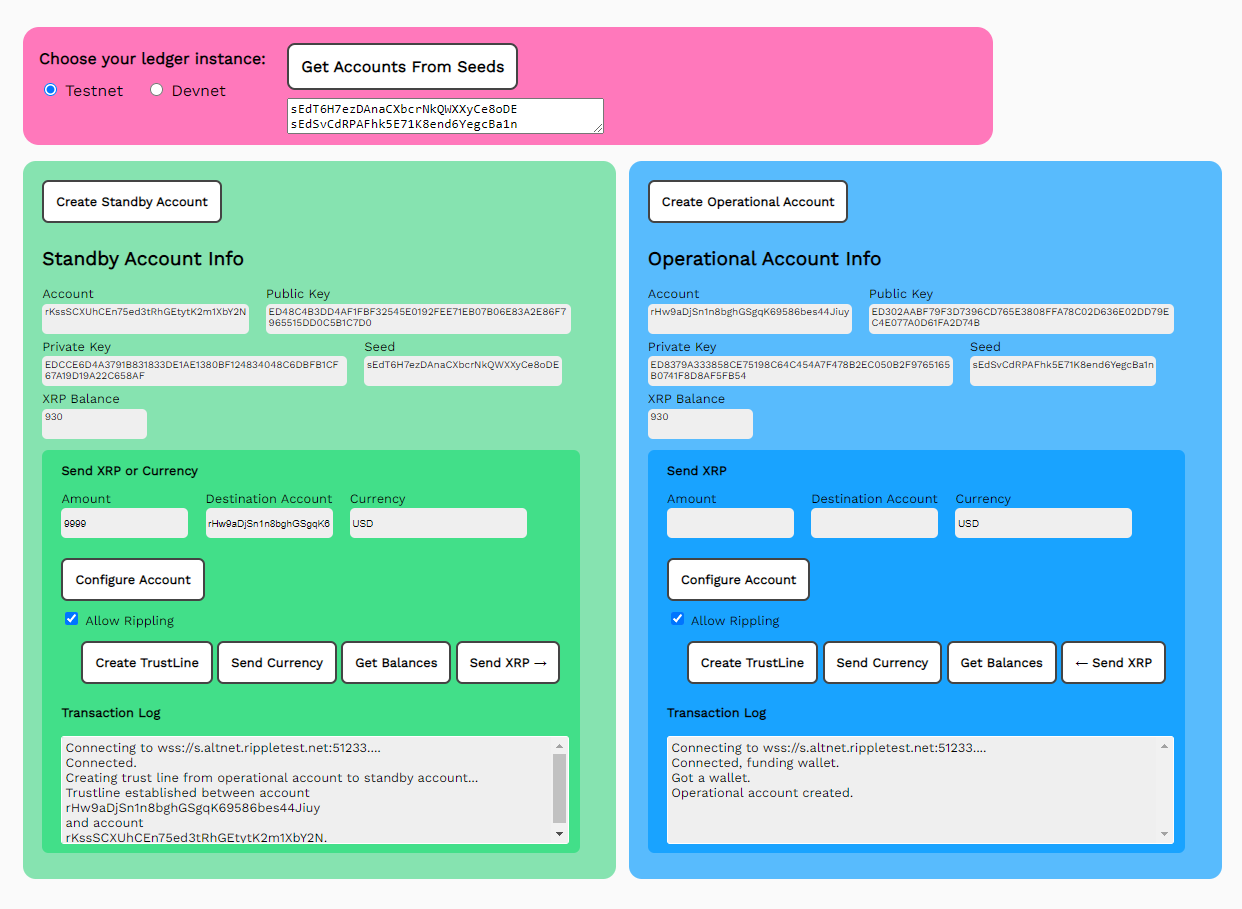
トラストラインの作成
アカウント間でトラストラインを作成するには:
- 通貨フィールドに通貨コードを入力(ここではUSDを使用)。
- 金額フィールドに、最大の送金制限額(9999など)を入力
- 宛先フィールドに、宛先アカウントの値を入力します。
- トラストラインを作成をクリック
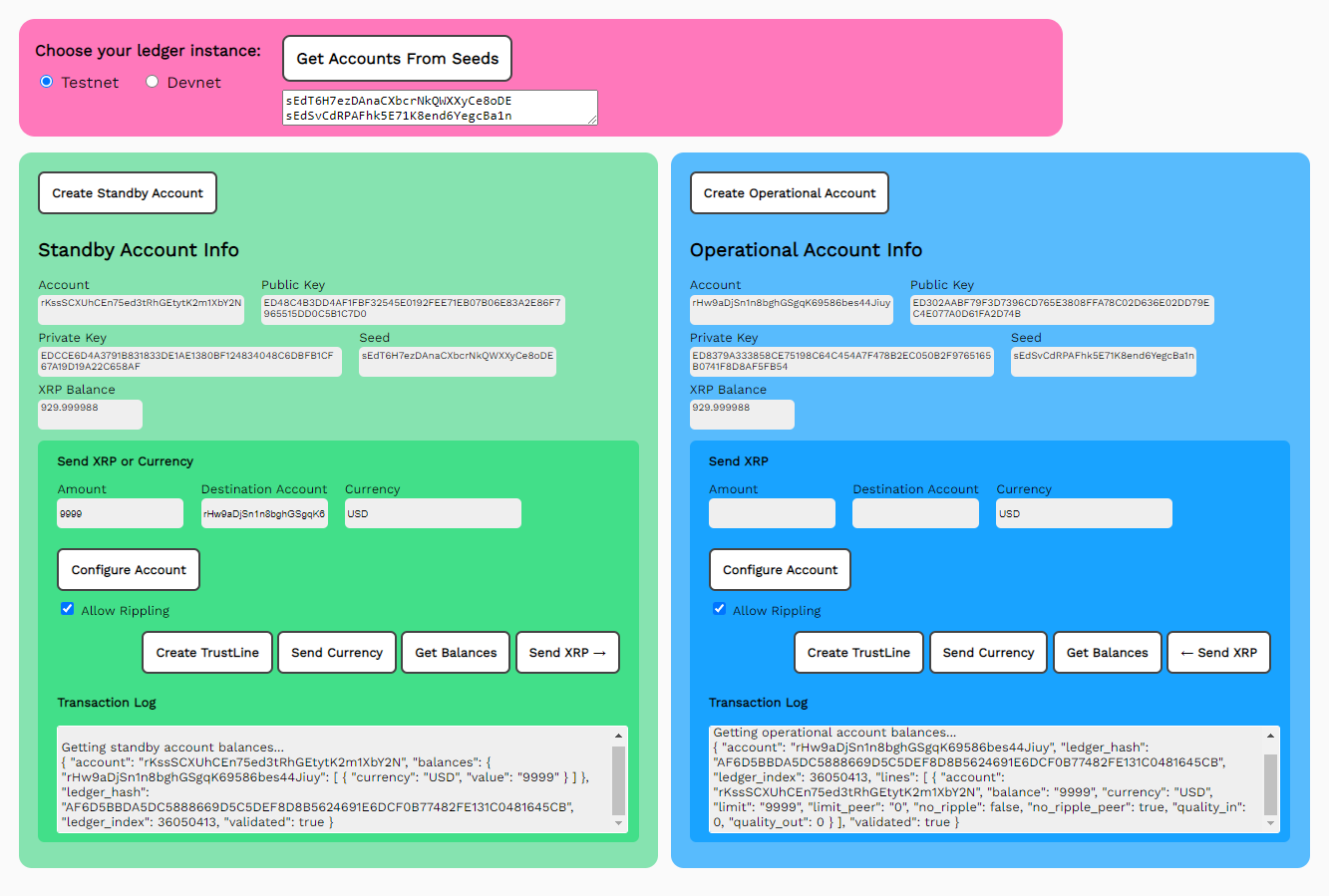
発行済みの通貨トークンの送信
発行された通貨トークンを転送するには、まずトラストラインを作成する必要があります。
- 金額の入力
- 宛先の入力
- 通貨の入力
- 通貨を送信をクリック
JavaScriptコードのウォークスルー:create-trustline-send-currency.js
configureAccount()
法定通貨の送金では、XRPのように資金の実際の移動が同時には行われません。異なる通貨のために第三者に通貨が送金される場合、元の口座に影響を与える通貨の切り下げが発生する可能性があります。この通貨の上下の評価(ripplingと呼ばれます)を避けるため、デフォルトでは許可されていません。あるアカウントから送金された通貨は、同じアカウントにしか送金できません。第三者への通貨送金を有効にするには、defaultRIppletの値をtrueに設定する必要があります。Token Test Harnessには、ripplingを有効または無効にするためのチェックボックスがあります。
asfDefaultRipple フラグを設定し、false の場合はクリアします。// *******************************************************
// **************** アカウントの設定 ********************
// *******************************************************
async function configureAccount(type, rippleDefault) {
let net = getNet()
const client = new xrpl.Client(net)
results = 'Connecting to ' + getNet() + '....'
standbyResultField.value = results
await client.connect()
results += 'nConnected, finding wallet.'
standbyResultField.value = results
if (type=='standby') {
my_wallet = xrpl.Wallet.fromSeed(standbySeedField.value)
} else {
my_wallet = xrpl.Wallet.fromSeed(operationalSeedField.value)
}
results += 'Ripple Default Setting: ' + rippleDefault
standbyResultField.value = results
let settings_tx = {}
if (rippleDefault) {
settings_tx = {
"TransactionType": "AccountSet",
"Account": my_wallet.address,
"SetFlag": xrpl.AccountSetAsfFlags.asfDefaultRipple
}
results += 'n Set Default Ripple flag.'
} else {
settings_tx = {
"TransactionType": "AccountSet",
"Account": my_wallet.address,
"ClearFlag": xrpl.AccountSetAsfFlags.asfDefaultRipple
}
results += 'n Clear Default Ripple flag.'
}
results += 'nSending account setting.'
standbyResultField.value = results
const cst_prepared = await client.autofill(settings_tx)
const cst_signed = my_wallet.sign(cst_prepared)
const cst_result = await client.submitAndWait(cst_signed.tx_blob)
if (cst_result.result.meta.TransactionResult == "tesSUCCESS") {
results += 'nAccount setting succeeded.'
standbyResultField.value = results
} else {
throw 'Error sending transaction: ${cst_result}'
results += 'nAccount setting failed.'
standbyResultField.value = results
}
client.disconnect()
} // configureAccount()の終わり
createTrustline()
トラストラインを使用すると、2つのアカウントが、設定された上限まで特定の通貨を取引できるようになります。これにより、参加者は、すべての取引が既知のエンティティ間で、合意された最大金額内で行われることを保証されます。
// *******************************************************
// ***************** トラストラインの作成 ********************
// *******************************************************

      async function createTrustline() {
        let net = getNet()
        const client = new xrpl.Client(net)
        results = 'Connecting to ' + getNet() + '....'
        standbyResultField.value = results

        await client.connect()

        results += 'nConnected.'
        standbyResultField.value = results

        const standby_wallet = xrpl.Wallet.fromSeed(standbySeedField.value)
        const operational_wallet = xrpl.Wallet.fromSeed(operationalSeedField.value)
        const currency_code = standbyCurrencyField.value

        const trustSet_tx = {
          "TransactionType": "TrustSet",
          "Account": standbyDestinationField.value,
          "LimitAmount": {
            "currency": standbyCurrencyField.value,
            "issuer": standby_wallet.address,
            "value": standbyAmountField.value
          }
        }
        const ts_prepared = await client.autofill(trustSet_tx)

        const ts_signed = operational_wallet.sign(ts_prepared)
        results += 'nCreating trust line from operational account to standby account...'
        standbyResultField.value = results
        const ts_result = await client.submitAndWait(ts_signed.tx_blob)
        if (ts_result.result.meta.TransactionResult == "tesSUCCESS") {
          results += 'nTrustline established between account n' + standbyDestinationField.value + ' n and accountn' + standby_wallet.address + '.'
          standbyResultField.value = results
        } else {
          results += 'nTrustLine failed. See JavaScript console for details.'
          standbyResultField.value = results
          throw 'Error sending transaction: ${ts_result.result.meta.TransactionResult}'
        }
      } //End of createTrustline()
sendCurrency()で発行済みトークンの送信
アカウントから自身のアカウントへのトラストラインを作成したら、設定された制限まで、発行された通貨トークンをそのアカウントに送信できます。
// *******************************************************
// *************** 発行済みトークンの送信 ******************
// *******************************************************

      async function sendCurrency() {
        let net = getNet()
        const client = new xrpl.Client(net)
        results = 'Connecting to ' + getNet() + '....'
        standbyResultField.value = results

        await client.connect()

        results += 'nConnected.'
        standbyResultField.value = results

        const standby_wallet = xrpl.Wallet.fromSeed(standbySeedField.value)
        const operational_wallet = xrpl.Wallet.fromSeed(operationalSeedField.value)
        const currency_code = standbyCurrencyField.value
        const issue_quantity = standbyAmountField.value

        const send_token_tx = {
          "TransactionType": "Payment",
          "Account": standby_wallet.address,
          "Amount": {
            "currency": standbyCurrencyField.value,
            "value": standbyAmountField.value,
            "issuer": standby_wallet.address
          },
          "Destination": standbyDestinationField.value
        }

        const pay_prepared = await client.autofill(send_token_tx)

        const pay_signed = standby_wallet.sign(pay_prepared)
        results += 'Sending ' + standbyAmountField.value + standbyCurrencyField.value + 'to ' + standbyDestinationField.value + '...'
        standbyResultField.value = results
        const pay_result = await client.submitAndWait(pay_signed.tx_blob)
        if (pay_result.result.meta.TransactionResult == "tesSUCCESS") {
          results += 'Transaction succeeded: https://testnet.xrpl.org/transactions/${pay_signed.hash}'
          standbyResultField.value = results
        } else {
          results += 'Transaction failed: See JavaScript console for details.'
          standbyResultField.value = results
          throw 'Error sending transaction: ${pay_result.result.meta.TransactionResult}'
        }
        standbyBalanceField.value =
              (await client.getXrpBalance(standby_wallet.address))
        operationalBalanceField.value =
              (await client.getXrpBalance(operational_wallet.address))
        getBalances()
        client.disconnect()

      } // end of sendIOU()
getBalances()
// *******************************************************
// ****************** Get Balances ***********************
// *******************************************************

      async function getBalances() {
        let net = getNet()
        const client = new xrpl.Client(net)
        results = 'Connecting to ' + getNet() + '....'
        standbyResultField.value = results

        await client.connect()

        results += 'nConnected.'
        standbyResultField.value = results

        const standby_wallet = xrpl.Wallet.fromSeed(standbySeedField.value)
        const operational_wallet = xrpl.Wallet.fromSeed(operationalSeedField.value)

        results= "nGetting standby account balances...n"
        const standby_balances = await client.request({
          command: "gateway_balances",
          account: standby_wallet.address,
          ledger_index: "validated",
          hotwallet: [operational_wallet.address]
        })
        results += JSON.stringify(standby_balances.result, null, 2)
        standbyResultField.value = results

        results= "nGetting operational account balances...n"
        const operational_balances = await client.request({
          command: "account_lines",
          account: operational_wallet.address,
          ledger_index: "validated"
        })
        results += JSON.stringify(operational_balances.result, null, 2)
        operationalResultField.value = results

        operationalBalanceField.value =
          (await client.getXrpBalance(operational_wallet.address))
        standbyBalanceField.value =
          (await client.getXrpBalance(standby_wallet.address))

        client.disconnect()

      } // End of getBalances()
反対のトランザクション oPcreateTrustline() とoPsendCurrency()
それぞれのトランザクションには、運用アカウントに対応する相互トランザクションが、oPという接頭辞を付けて存在します。コードの解説については、スタンバイアカウントに対応する関数を参照してください。getBalances()リクエストは、両方のアカウントの残高を報告するため、相互トランザクションはありません。
// **********************************************************************
// ****** 反対のトランザクション ***************************************
// **********************************************************************

// *******************************************************
// ************ 運用アカウントのトラストラインを作成 *************
// *******************************************************

      async function oPcreateTrustline() {
        let net = getNet()
        const client = new xrpl.Client(net)
        results = 'Connecting to ' + getNet() + '....'
        operationalResultField.value = results

        await client.connect()

        results += 'nConnected.'
        operationalResultField.value = results

        const standby_wallet = xrpl.Wallet.fromSeed(standbySeedField.value)
        const operational_wallet = xrpl.Wallet.fromSeed(operationalSeedField.value)
        const trustSet_tx = {
          "TransactionType": "TrustSet",
          "Account": operationalDestinationField.value,
          "LimitAmount": {
            "currency": operationalCurrencyField.value,
            "issuer": operational_wallet.address,
            "value": operationalAmountField.value
          }
        }
        const ts_prepared = await client.autofill(trustSet_tx)
        const ts_signed = standby_wallet.sign(ts_prepared)
        results += 'nCreating trust line from operational account to ' + operationalDestinationField.value + ' account...'
        operationalResultField.value = results
        const ts_result = await client.submitAndWait(ts_signed.tx_blob)
        if (ts_result.result.meta.TransactionResult == "tesSUCCESS") {
          results += 'nTrustline established between account n' + standby_wallet.address + ' n and accountn' + operationalDestinationField.value + '.'
          operationalResultField.value = results
        } else {
          results += 'nTrustLine failed. See JavaScript console for details.'
          operationalResultField.value = results
          throw 'Error sending transaction: ${ts_result.result.meta.TransactionResult}'
        }
      } //oPcreateTrustline()の終わり

// *******************************************************
// ************* 運用アカウントから発行済みトークンの送信 ********
// *******************************************************

      async function oPsendCurrency() {
        let net = getNet()
        const client = new xrpl.Client(net)
        results = 'Connecting to ' + getNet() + '....'
        operationalResultField.value = results

        await client.connect()

        results += 'nConnected.'
        operationalResultField.value = results

        const standby_wallet = xrpl.Wallet.fromSeed(standbySeedField.value)
        const operational_wallet = xrpl.Wallet.fromSeed(operationalSeedField.value)
        const currency_code = operationalCurrencyField.value
        const issue_quantity = operationalAmountField.value

        const send_token_tx = {
          "TransactionType": "Payment",
          "Account": operational_wallet.address,
          "Amount": {
            "currency": currency_code,
            "value": issue_quantity,
            "issuer": operational_wallet.address
          },
          "Destination": operationalDestinationField.value
        }

        const pay_prepared = await client.autofill(send_token_tx)
        const pay_signed = operational_wallet.sign(pay_prepared)
        results += 'Sending' + operationalAmountField.value + operationalCurrencyField.value + ' to ' + operationalDestinationField.value + '...'
        operationalResultField.value = results
        const pay_result = await client.submitAndWait(pay_signed.tx_blob)
        if (pay_result.result.meta.TransactionResult == "tesSUCCESS") {
          results += 'Transaction succeeded: https://testnet.xrpl.org/transactions/${pay_signed.hash}'
          operationalResultField.value = results
        } else {
          results += 'Transaction failed: See JavaScript console for details.'
          operationalResultField.value = results
          throw 'Error sending transaction: ${pay_result.result.meta.TransactionResult}'
        }
        standbyBalanceField.value =
              (await client.getXrpBalance(standby_wallet.address))
        operationalBalanceField.value =
              (await client.getXrpBalance(operational_wallet.address))
        getBalances()
        client.disconnect()

      } // end of oPsendCurrency()
HTMLフォームのプレビュー:2.create-trustline-send-currency.html
新しい機能をサポートするようにフォームを更新します。
<html>
  <head>
    <title>Token Test Harness</title>
    <link href='https://fonts.googleapis.com/css?family=Work Sans' rel='stylesheet'>
    <style>
       body{font-family: "Work Sans", sans-serif;padding: 20px;background: #fafafa;}
       h1{font-weight: bold;}
       input, button {padding: 6px;margin-bottom: 8px;}
       button{font-weight: bold;font-family: "Work Sans", sans-serif;}
       td{vertical-align: top;padding-right:10px;}
    </style>
    <script src='https://unpkg.com/xrpl@2.2.3'></script>

    <script>
      if (typeof module !== "undefined") {
        const xrpl = require('xrpl')
      }
    </script>
  </head>

<!-- ************************************************************** -->
<!-- ********************** The Form ****************************** -->
<!-- ************************************************************** -->

  <body>
    <h1>Token Test Harness</h1>
    <form id="theForm">
            Choose your ledger instance:
      <input type="radio" id="tn" name="server" value="wss://s.altnet.rippletest.net:51233" >
      <label for="testnet">Testnet</label>

      <input type="radio" id="dn" name="server" value="wss://s.devnet.rippletest.net:51233" checked>
      <label for="devnet">Devnet</label>
      <br/><br/>
      <button type="button" onClick="getAccountsFromSeeds()">Get Accounts From Seeds</button>
      <br/>
      <textarea id="seeds" cols="40" rows= "2"></textarea>
      <br/><br/>
      <table>
        <tr valign="top">
          <td>
            <button type="button" onClick="getAccount('standby')">Get New Standby Account</button>
            <table>
              <tr valign="top">
                <td align="left">
                  Standby Account<br/> <input type="text" id="standbyAccountField" size="30" />
                </td>
                <td></td>
              </tr>
              <tr>
                <td align="left">
                  Public Key<br/>
                  <input type="text" id="standbyPubKeyField" size="30"></input>                                                 </td>
                <td align="left">
                  Private Key<br/>
                  <input type="text" id="standbyPrivKeyField" size="30"></input>
                </td>
              </tr>
              <tr>
                <td align="left">
                  Seed <br/>
                  <input type="text" id="standbySeedField" size="30"></input>
                  <br>
                </td>
                <td align="left">
                  XRP Balance <br/>
                  <input type="text" id="standbyBalanceField" size="30"></input>
                </td>
            </tr>
            <tr>
                <td align="left">
                  Amount<br/>
                  <input type="text" id="standbyAmountField" size="30"></input>
                </td>
                <td align="left">
                  Destination Account <br/>
                <input type="text" id="standbyDestinationField" size="30"></input>
                </td>
              </tr>
              <tr valign="top">
                <td><button type="button" onClick="configureAccount('standby',document.querySelector('#standbyDefault').checked)">Configure Account</button><br/>
                  <input type="checkbox" id="standbyDefault" checked="true"/>
                  <label for="standbyDefault">Allow Rippling</label>
                </td>

                <td>
                  Currency<br/>
                  <input type="text" id="standbyCurrencyField" size="30" value="USD"></input>
                </td>
              </tr>
              <tr>
                <td colspan=2>
                  <p align="right">
                    <button type="button" onClick="sendXRP()">Send XRP ↓</button>
                    <button type="button" onClick="createTrustline()">Create TrustLine</button>
                    <button type="button" onClick="sendCurrency()">Send Currency</button>
                    <button type="button" onClick="getBalances()">Get Balances</button>
                  </p>
                </td>
              </tr>
            </table>
          </td>
          <td>
            <textarea id="standbyResultField" cols="60" rows="20" ></textarea>
          </td>
        </tr>
      </table>
      <br/><br/>
      <table>
        <tr valign="top">
          <td>
            <button type="button" onClick="getAccount('operational')">Get New Operational Account</button>
            <table>
              <tr valign="top">
                <td align="left">
                  Operational Account<br/> <input type="text" id="operationalAccountField" size="30" />
                </td>
                <td></td>
              </tr>
              <tr>
                <td align="left">Public Key<br/>
                  <input type="text" id="operationalPubKeyField" size="30" />
                </td>
                <td align="left">
                  Private Key<br/>
                  <input type="text" id="operationalPrivKeyField" size="30"></input>
                </td>
              </tr>
              <tr>
                <td align="left">
                  Seed <br/>
                  <input type="text" id="operationalSeedField" size="30"></input>
                  <br>
                </td>
                <td align="left">
                  XRP Balance <br/>
                  <input type="text" id="operationalBalanceField" size="30" />
                </td>
            </tr>
            <tr>
                <td align="left">
                  Amount<br/>
                  <input type="text" id="operationalAmountField" size="30" />
                </td>
                <td align="left">
                  Destination Account <br/>
                <input type="text" id="operationalDestinationField" size="30" />
                </td>
              </tr>
              <tr valign="top">
                <td><button type="button" onClick="configureAccount('operational',document.querySelector('#operationalDefault').checked)">Configure Account</button><br/>
                  <input type="checkbox" id="operatoinalDefault" checked="true"/>
                  <label for="operationalDefault">Allow Rippling</label>
                </td>

                <td>
                  Currency<br/>
                  <input type="text" id="operationalCurrencyField" size="30" value="USD"></input>
                </td>
              </tr>
              <tr>
                <td colspan=2>
                  <p align="right">
                    <button type="button" onClick="oPsendXRP()">Send XRP ↑</button>
                    <button type="button" onClick="oPcreateTrustline()">Create TrustLine</button>
                    <button type="button" onClick="oPsendCurrency()">Send Currency</button>
                    <button type="button" onClick="getBalances()">Get Balances</button>
                  </p>
                </td>
              </tr>
            </table>
          </td>
          <td>
            <textarea id="operationalResultField" cols="60" rows="20" ></textarea>
          </td>
        </tr>
      </table>
    </form>
  </body>
  <script src='ripplex1-send-xrp.js' async></script>
  <script src='ripplex2-send-currency.js' async></script>
</html>